
This Blog is deleting...

Please go to my new Blog:

http://itnews24h.blogspot.com


Loading...
Custom Search

Tuesday, November 11, 2008

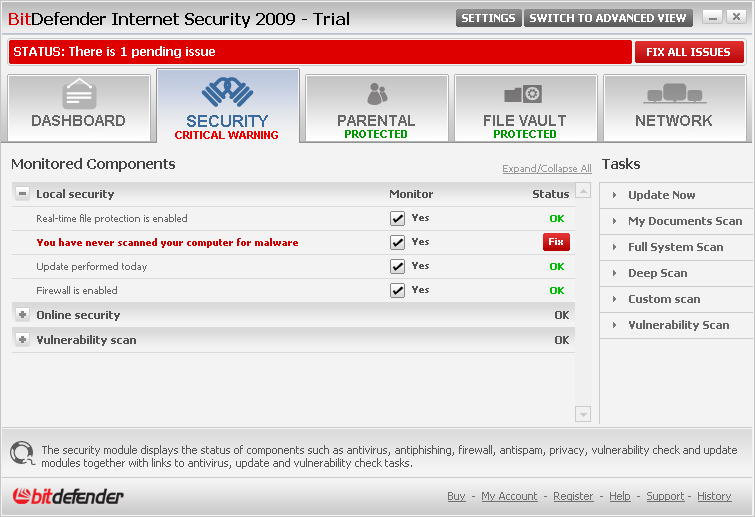
BitDefender Internet Security 2009 Build 12.0.10 final

BitDefender Internet Security 2009 keeps your Internet-connected family safe, without slowing down their PCs. It locks out viruses, hackers & spam, while providing parental control and firewall protection.


Confidently download, share and open files from friends, family, co-workers - and even total strangers!
* Improved: Scans all web, e-mail and instant messaging traffic for viruses and spyware, in real-time
* Proactively protects against new virus outbreaks using advanced heuristics

Protect your identity: shop, bank, listen, watch privately and securely

* Blocks attempted identity theft (phishing)
* Improved: Prevents personal information from leaking via e-mail, web or instant messaging


Guard your conversations with top-of-the line encryption
* NEWInstant Messaging Encryption
* NEWFile Vault securely stores personal information or sensitive files


Connect securely to any network at home, in the office or away
* Automatically modifies firewall protection settings to suit location
* Wi-Fi monitor helps prevent unauthorized access to your Wi-Fi network


Protect your family and their computers!
* Blocks access to inappropriate websites and e-mail
* Schedules and limits kids’ access to Internet and to applications

Play safe, play seamlessly!
* Improved: Reduces the system load and avoids requesting user interaction during games


Get fine-tuned performance from your computer !
* Uses few system resources
* NEWLaptop mode prolongs battery life

Features and Benefits
NEWFamily network protection
Manage the security of your home network from a single location. BitDefender software from other computers in the network can be remotely configured, while tasks such as scans, backups tune-ups and updates can be run on-demand or scheduled to run during off-hours.

Hassle – Free Hourly Updates
Hourly updates ensure that you are protected against the latest threats without pushing a button. Lost program files are not a problem either. In the rare event of file damage due to PC problems, BitDefender automatically repairs and updates itself.

System Requirements
Windows XP with Service Pack 2 (32/64 bit) or higher
* 800 MHz or higher processor
* 256 MB of RAM Memory (512 MB recommended)
* 300 MB available hard disk space

Windows Vista (32/64 bit) and Windows Vista SP1
* 800 MHz or higher processor
* 512 MB of RAM Memory (1 GB recommended)
* 300 MB available hard disk space

Windows Home Server
* 800 MHz or higher processor
* 512 MB of RAM Memory (1 GB recommended)
* 300 MB available hard disk space

Internet Explorer 6.0 (or higher)
.NET Framework 1.1 (also available in the installer kit)

Download:
http://rapidshare.com/files/139448607/bitdefender_internetsecurity_2009_32b.exe

Keygen:
http://rapidshare.com/files/139448605/keygen.rar

Read more and get download link...

Portable Ulead COOL 3D 3.5


Ulead COOL 3D 3.5 allows designers to create high-impact 3D images. Output these 3D images as still graphics, animations, video or Macromedia� Flash� . Ulead COOL 3D delivers stunning 3D graphics, without the complexities found in other software packages.


Features:

Customizable 3D Art in an Instant
With COOL 3D 3.5, your text and shapes are easily customizable into eye-catching 3D. It only takes a couple of clicks to access many convenient features.
* Group/ungroup text and objects
* Import Adobe� Illustrator� 8.0 files
* Import asymmetrical DirectX� objects
* Create or trace vector objects with the Path Editor
* Switch to Wireframe mode
* Access versatile output options

Animate and Add Special Effects
Ulead COOL 3D's animation timeline is easy to use, yet powerful. Make your animation stand out with special effects you can drag-and-drop from the EasyPalette�
* Animate objects to move in any direction
* Customize 26 stunning Special Effects. Add even more with PLUG-IN MADNESS II & III
* Download free backgrounds, textures and presets bi-monthly to ensure you have limitless creative option

Very Vector, Very Flash�
Making 3D objects for Macromedia� Flash� just got easier! Output vector-based Flash with the new EnVector module, a bonus tool for Flash fans.
* Edit in the familiar COOL 3D WYSIWYG editing environment
* View the vector-only output in a seperate interface for precise editing
* Import Adobe� Illustrator� 8.0 files or use the Path Editor for enhanced creativity
* Import elements to Macromedia Flash and still be able to edit them

Web Sites, Videos and Presentations That Stand Out
It's easy to give your Web pages, video projects and PowerPoint� presentation projects a professional edge with COOL 3D.
* Create great, optimized 3D buttons and images for Web sites
* Generate 32-bit overlay output for video work
* Add the power of 3D to your presentations

Size: 120 MB (75+45)

Links/Downloads/Codes:
http://w18.easy-share.com/1702345826.html  http://w18.easy-share.com/1702345908.html
Or

Links/Downloads/Codes:
http://letitbit.net/download/ddd112520697/Portable-Ulead-COOL-3D-3.5.part1.rar.html  http://letitbit.net/download/def6b2667815/Portable-Ulead-COOL-3D-3.5.part2.rar.html

Read more and get download link...

YouTubeGet 4.7 - The Best YouTube Downloader

YoutubeGet version 4.7 provides easy work of downloading and converting videos from YouTube. Offering a multitude of methods to acquire the video, this application has all the power you need while still remaining small and easy to use. After downloading videos it will auto convert FLV files to MP3, MP4, 3GP, AVI, WMV, MOV etc. Soon, you can see youtube videos on your iPod, iPhone, PSP or mobile phone! 


Introduction:
1. Download YouTubeGet (look below for the link) 
2. Open the folder then install it 
Important Step - 3. When it has installed DO NOT CLICK Launch YouTubeGet. Instead, uncheck it. 
4. Go to the cracked version of the program (if you are having trouble, it is called sound.dll) 
5. If you changed the location of YouTubeGet when you installed it, then find the directory folder. If you left it as it was, go to My Comper > Local Disk > YouTubeGet 
6. Replace sound.dll with the cracked one 
7. Congratulations! You now have the best youtube downloader on the planet for FREE!!!!!


System Requirements 
PII 466MHZ,16M RAM 

What's new 
Big DPI Screen Bug Fixed.

Download:
http://rapidshare.com/files/161855624/youtubeget_WwW.DownloadPresent.Com.rar


Read more and get download link...

Wednesday, October 29, 2008

How to redirect old blog on Blogger to new one

how to do it


Here are the answers to the three questions:


  1. Redirect your visitors by combining JavaScript and meta tag redirects. Read below.

  2. Bad news, this is not possible. Tom Sherman correctly states

    This would require a 301 Permanent Redirect and access to the server, not provided by Blogger.


  3. If you don't want to be punished by Google for duplicating content you must remove the old blog from the Google cache and tell it to ignore the old site from now on. Read below below.


set up redirects


I'm assuming that at this point you have imported your posts to the new blog at Wordpress.com (if not, go to "Manage/Import", select the obvious choice and do what you're said).


Log into your Blogger account and click your way through the awkward navigation menu until you are at the "Template/Edit HTML" page. To redirect visitors from the main page, insert the following between the <head> and </head> tags:


<meta content='6;url=http://yournewblog.wordpress.com/' http-equiv='refresh'/>


Number 6 means that the redirection will take effect after 6 seconds. Replace the url with your own.


The tricky part comes now. We want to redirect users from individual post pages to the corresponding post pages on the new blog. For that, we need a piece of JavaScript spiced with Blogger proprietary tags. Insert the following right after "<b:section class='main' id='main' showaddelement='no'>" in the template:


<b:widget id='Redirector' locked='true' title='Blog Posts' type='Blog'>

<b:includable id='main'>

<b:if cond='data:blog.pageType == "item"'>

<b:loop values='data:posts' var='post'>

<script type='text/javascript'>

var new_page=&#39;yournewblog.wordpress.com/&#39;;

var permalink = &#39;<data:post.url/>&#39;;

var timestamp = &#39;<data:post.timestamp/>&#39;;

timestamp = timestamp.split(&#39;/&#39;);

timestamp = timestamp[2]+&#39;/&#39;+timestamp[0]+&#39;/&#39;+timestamp[1];

new_page = permalink.replace(/youroldblog\.blogspot\.com\/2007\/[0-9]{2}/,new_page+timestamp);

new_page = new_page.replace(/\.html$/,&#39;&#39;);


document.location.href = new_page;

</script>

</b:loop>

</b:if>

</b:includable>

</b:widget>


Don't forget to enter your new blog's URL at var new_page = .


Important note! For this script to work, all your posts should have been imported to Wordpress.com using their Manage/Import function. The creation dates of all posts must match, because they are part of the permalinks.


remove duplicate content


Insert the following between the <head> and </head> tags:


<meta name="ROBOTS" content="NOINDEX, NOFOLLOW"/>

After seeing this, search engines should remove your old blog from their cache and the old content will stop existing for them. Therefore they are not going to penalize your new blog for duplicate content.


optionally, display a message


This is not required, but helpful for your readers. Tell them that you have moved and that they are going to be redirected. Right after the <body> tag, insert this:


<div style='position: absolute; top: 30px; left: 30px; border: solid 2px #333; color: #000; background-color: yellow; padding: 5px; width: 400px; z-index: 5; font-family: Verdana, Geneva, Arial, Helvetica, sans-serif; font-size: large;'>

<p><strong>My blog has moved!</strong></p>

<p>You should be automatically redirected in 6 seconds. If not, visit<br/> <a href='http://yournewblog.wordpress.com/'> <strong>http://yournewblog.wordpress.com</strong></a> <br/> and update your bookmarks.</p>

</div>


Well, now we are set. Found any errors in this tutorial or have more tips? Share them in the comments please. :-)


Read more and get download link...

How to redirect Blogger to Wordpress.com

If you have decided to move your blog from blogspot.com to wordpress.com (the shared Wordpress hosting site), you are asking yourself three questions:

  1. How to redirect visitors to the old blog automatically to the new pages.
  2. How to transfer the PageRank of your old blog to the new one.
  3. How to prevent being penalized by Google for duplicate content.

Is it possible ? Read on.


how to do it


Here are the answers to the three questions:


  1. Redirect your visitors by combining JavaScript and meta tag redirects. Read below.

  2. Bad news, this is not possible. Tom Sherman correctly states

    This would require a 301 Permanent Redirect and access to the server, not provided by Blogger.


  3. If you don't want to be punished by Google for duplicating content you must remove the old blog from the Google cache and tell it to ignore the old site from now on. Read below below.


set up redirects


I'm assuming that at this point you have imported your posts to the new blog at Wordpress.com (if not, go to "Manage/Import", select the obvious choice and do what you're said).


Log into your Blogger account and click your way through the awkward navigation menu until you are at the "Template/Edit HTML" page. To redirect visitors from the main page, insert the following between the <head> and </head> tags:


<meta content='6;url=http://yournewblog.wordpress.com/' http-equiv='refresh'/>


Number 6 means that the redirection will take effect after 6 seconds. Replace the url with your own.


The tricky part comes now. We want to redirect users from individual post pages to the corresponding post pages on the new blog. For that, we need a piece of JavaScript spiced with Blogger proprietary tags. Insert the following right after "<b:section class='main' id='main' showaddelement='no'>" in the template:


<b:widget id='Redirector' locked='true' title='Blog Posts' type='Blog'>

<b:includable id='main'>

<b:if cond='data:blog.pageType == "item"'>

<b:loop values='data:posts' var='post'>

<script type='text/javascript'>

var new_page=&#39;yournewblog.wordpress.com/&#39;;

var permalink = &#39;<data:post.url/>&#39;;

var timestamp = &#39;<data:post.timestamp/>&#39;;

timestamp = timestamp.split(&#39;/&#39;);

timestamp = timestamp[2]+&#39;/&#39;+timestamp[0]+&#39;/&#39;+timestamp[1];

new_page = permalink.replace(/youroldblog\.blogspot\.com\/2007\/[0-9]{2}/,new_page+timestamp);

new_page = new_page.replace(/\.html$/,&#39;&#39;);


document.location.href = new_page;

</script>

</b:loop>

</b:if>

</b:includable>

</b:widget>


Don't forget to enter your new blog's URL at var new_page = .


Important note! For this script to work, all your posts should have been imported to Wordpress.com using their Manage/Import function. The creation dates of all posts must match, because they are part of the permalinks.


remove duplicate content


Insert the following between the <head> and </head> tags:


<meta name="ROBOTS" content="NOINDEX, NOFOLLOW"/>

After seeing this, search engines should remove your old blog from their cache and the old content will stop existing for them. Therefore they are not going to penalize your new blog for duplicate content.


optionally, display a message


This is not required, but helpful for your readers. Tell them that you have moved and that they are going to be redirected. Right after the <body> tag, insert this:


<div style='position: absolute; top: 30px; left: 30px; border: solid 2px #333; color: #000; background-color: yellow; padding: 5px; width: 400px; z-index: 5; font-family: Verdana, Geneva, Arial, Helvetica, sans-serif; font-size: large;'>

<p><strong>My blog has moved!</strong></p>

<p>You should be automatically redirected in 6 seconds. If not, visit<br/> <a href='http://yournewblog.wordpress.com/'> <strong>http://yournewblog.wordpress.com</strong></a> <br/> and update your bookmarks.</p>

</div>


Well, now we are set. Found any errors in this tutorial or have more tips? Share them in the comments please. :-)


Read more and get download link...

Tuesday, October 28, 2008

Get to the Top on Google

Description
Written in a clear, non-technical, style by a leading expert in SEO (search engine optimization), GTTTOG explains techniques and strategies proven to return higher search engine rankings and sales. It addresses all aspects of search engine marketing and includes an assessment of the impact of Web 2.0 on Internet search strategies.


Get to the Top on Google:Tips and Techniques to Get Your Site to the Top of the Search Engine Rankings and Stay There /byDavid Viney(Author)
Nicholas Brealey Publishing(2008-05-01) | PDF(file-240 pages) | 2.2 mb(rar size)

Download Ebook  Get to the Top on Google


Read more and get download link...

Mobile - BlueTooth Hacking and Extras AIO

ImageShack

 Once connected to a another phone via bluetooth you can:
- read his messages
- read his contacts
- change profile
- play his ringtone even if phone is on silent


- play his songs(in his phone)
- restart the phone
- switch off the phone
- restore factory settings
- change ringing volume
- And here comes the best
“Call from his phone” it includes all call functions like hold etc.
Super Bluetooth Hack for S60 2nd-3rd devices.

Download Here


Read more and get download link...

------------------------------

Related Articles